【UdemyJS】Section3笔记(共20节)JS基础-Part2

【UdemyJS】Section3笔记(共20节)JS基础-Part2

Artificial-Fool Lv3

3-2 Activate Strict Mode

1
2
3
4
5
6
7
'use strict';//必须在文件的第一行

let hasDriversLicense=false;
const passTest=true;

if(passTest) hasDriverLicense=true; //此处打错变量名;
if(hasDriversLicense)console.log('I can drive:D'):

当严格模式未激活时,该程序不会报错也不会输出,因为原变量hasDriversLicense未被改变,反而而生成了一个新的变量hasDriverLicense;
当严格模式激活时,在hasDriverLicense处会直接报错defined,从而避免意料之外的bug。

严格模式还会禁止使用预留词汇定义变量等。启用严格模式能帮助我们编写更安全的代码。

3-3 Functions

Functions就像变量,都是一个有名字的盒子,只不过变量里面储存的是值,而函数储存的是语句。由于太熟悉了就不做笔记了。
Don’t repeat youself.

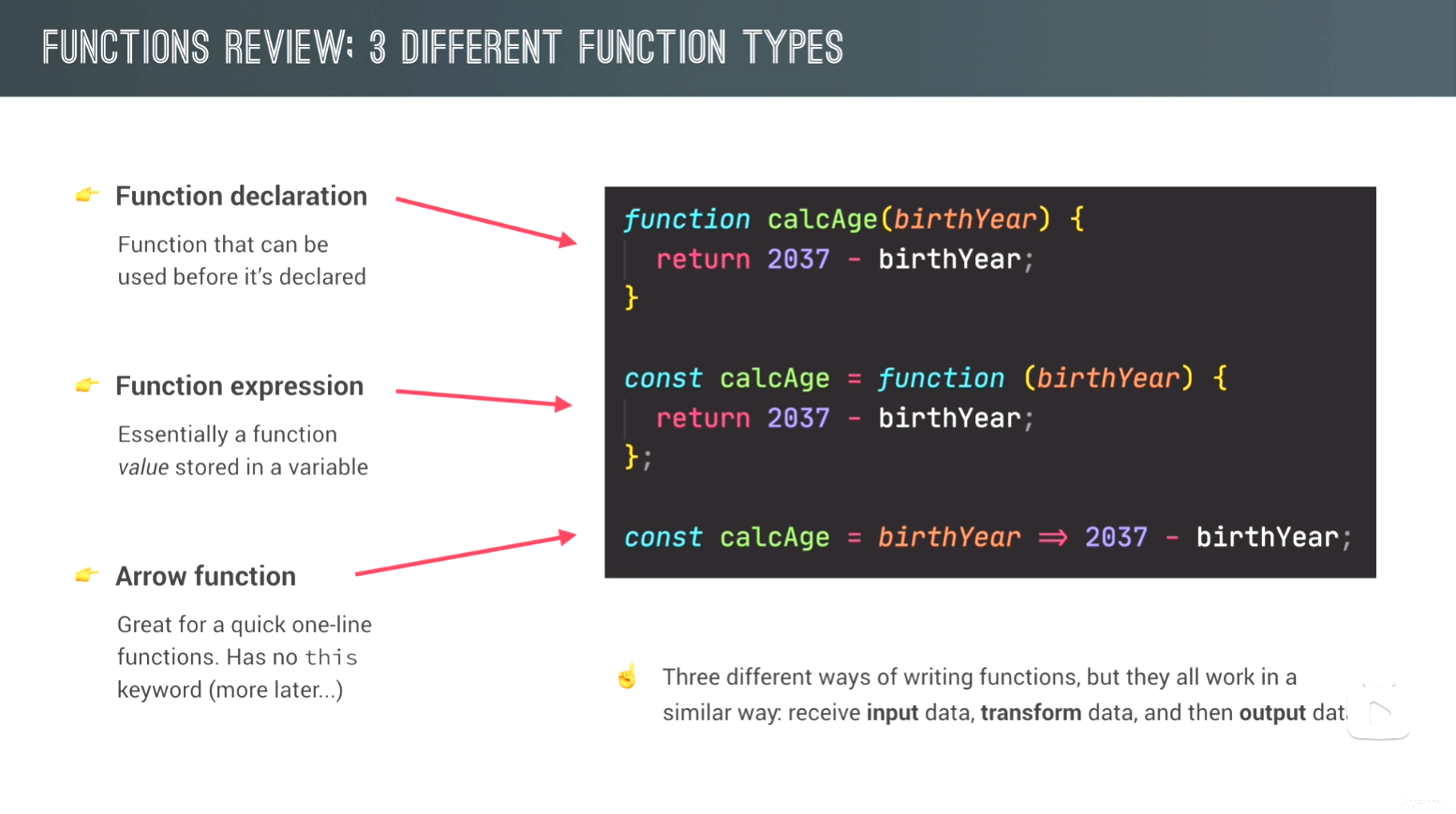
3-4 3-5 Function Declaration vs. Expressions vs. Arrow Functions

函数声明 & 函数表达式 & 箭头函数

function Name(){} 是最常用的函数定义方式,即函数声明;

1
2
3
4
5
6
// Function declaration
function calcAge1(birthYeah) {
return 2037 - birthYeah;
}
const age1 = calcAge1(1991);// calling / running / invoking a function
//普通函数声明可以在定义前被调用(hoisting)

因为函数是一个值,所以:
const Name = function(){} 将一个匿名函数封装进变量内,即函数表达式;

1
2
3
4
5
6
// Function expression
const calcAge2 = function (birthYeah) {
return 2037 - birthYeah;
}
const age2 = calcAge2(1991);
//函数表达式只有在声明后才能调用(就像一个未定义的变量只会返回空值undefined)

将函数表达式进一步简化,ES6更新了箭头函数:
const Name = parameter => …. ,one-line省略return和括号,更具简洁性和易读性。

1
2
3
4
5
6
7
8
9
10
11
12
// Arrow functions
const calcAge3 = birthYeah => 2037 - birthYeah;
const age3 = calcAge3(1991);
console.log(age3);

const yearsUntilRetirement = (birthYeah, firstName) => {
const age = 2037 - birthYeah;
const retirement = 65 - age;
return `${firstName} retires in ${retirement} years`;
}
//Arrow函数在需要更多代码行和参数的情况下,只相当于将function替换成了=>,不再那么简略了。
//另外,Arrow函数没有this关键字(虽然不知道为什么但是后面会讲:)

Screenshot

*现在是2024/11/27 4:00.

3-6 Functions Calling Other Functions

在函数中调用函数。

1
2
3
4
5
6
7
8
9
10
11
12
13
const cutPieces = function (fruit) {
return fruit * 4;
};

const fruitProcessor = function (apples, oranges) {
const applePieces = cutPieces(apples);
const orangePieces = cutPieces(oranges);

const juice = `Juice with ${applePieces} pieces of apple and ${orangePieces} pieces of orange.`;
return juice;
}

alert(fruitProcessor(2, 3));

3-7 Reviewing Functions

已整合进上文

3-8 Coding Challenge #1

1
2
3
4
5
6
7
8
9
10
11
12
13
14
15
const calcAverage = (a, b, c) => (a + b + c) / 3;
let avgDolphins = calcAverage(85, 54, 41);//use let, so we can reassign them.
let avgKoalas = calcAverage(23, 34, 27);//use let, so we can reassign them.
console.log(avgDolphins, avgKoalas);

const checkWinner = function (avgDolphins, avgKoalas) {
if (avgDolphins >= avgKoalas * 2) {
console.log(`Dolphins win (${avgDolphins} vs. ${avgKoalas})`);
} else if (avgKoalas >= avgDolphins * 2) {
console.log(`Koalas win (${avgKoalas} vs. ${avgDolphins})`);
} else {
console.log(`No team wins!`);
}
};
checkWinner(2, 1);

*现在是2024/11/27 15:37.

3-9 Introduction to Arrays

数组,js数据格式其一,以[]构成。
数组中元素的顺序十分重要,Array[index]可以取出对应的值。更多用于有序的数据;

1
2
3
4
5
6
7
8
9
10
11
12
13
14
15
//创建数组
const friends = ['Micheal','Steven','Peter'];
const years = new Array(1991,1984,2008,2020);//使用Array函数创建数组

console.log(friends[0]);//=> 'Micheal'
console.log(friends.length);//=> 3
console.log(friends[friends.length - 1]);//=> 'Peter'

//我们可以改动由const声明的数组,但是不能将整个数组替换为其他值。
friends[2]='Jay';//['Micheal','Steven','Jay']
//friends = ['Bob','Alice'];×××,会报错。

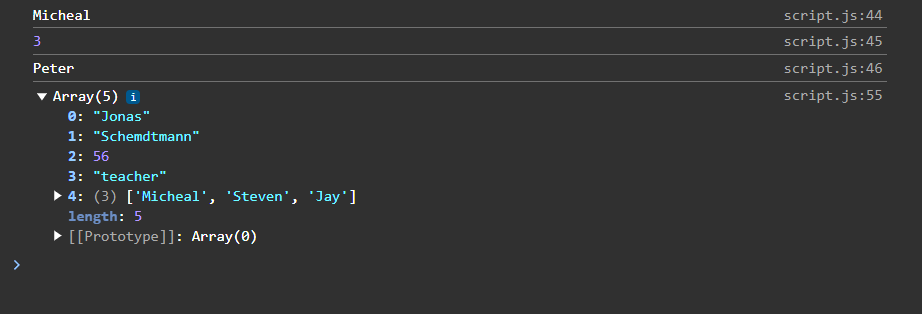
//Array数组非常灵活,可以容纳不同类型的值、变量、表达式、甚至另一个数组。
const firstName = 'Jonas';
const jonas = [firstName, 'Schemdtmann', 2047-1991, 'teacher', friends];

Screenshot

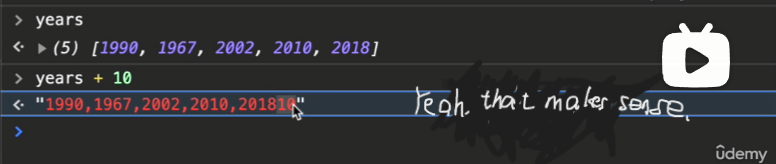
另外,一个数组+一个数字 会变成 一个字符串+一个字符串,就像这样:
所以是为了什么……

3-10 Basic Array Operations (Methods)

元素操作有shift、pop、unshift、push,元素查询有indexOf、includes

1
2
3
4
5
6
7
8
9
10
const friends = ['Micheal','Steven','Peter'];//假设每一行代码只输出不生效↓
//删除元素
friends.shift();//['Steven', 'Peter'];
friends.pop();//['Michael', 'Steven'];
//添加元素
friends.unshift('JOHN');//['JOHN', 'Micheal','Steven','Peter'];
friends.push('JONH');//['Micheal','Steven','Peter','JOHN'];
//检索元素(retrieve)
friends.indexOf('Steven');//1;
friends.includes('Steeven');//false;

3-11 Coding Challenge #2

计算小费并制作成数组:

1
2
3
4
5
6
7
8
9
10
11
12
13
14
15
16
17
18
19
20
21
22
23
24
25
26
const bills = [125, 555, 44];
const tips = [];
const totals = [];


// 极简函数:
const calcTip = bill => bill >= 50 && bill <= 300 ? bill * 0.15 : bill * 0.2;
// 经典函数:
// const calcTip = function (bill) {
// if (bill >= 50 && bill <= 300) {
// return bill * 0.15;
// } else if (bill >= 0) {
// return bill * 0.2;
// } else {
// return -1;
// }
// }

for (let i = 0; i < bills.length; i++) {
tips.push(calcTip(bills[i]));
totals.push(calcTip(bills[i]) + bills[i]);
}
console.log(bills);
console.log(tips);
console.log(totals);

3-12 Introduction to Objects

对象,js数据格式其二,以{}构成。
对象储存键值对,每一组称为一个属性(property)。对象无序,更多用于非结构化的数据;

1
2
3
4
5
6
7
8
//Object literal Syntax 对象文字语法
const jonas = {
firstName: 'Jonas',
lastName: 'Schmedtmann',
age: 2037 - 1991,
job: 'teacher',
friends: ['Micheal', 'Peter', 'Steven']
};

对象是JavaScript中最基础的概念(fundamental concept)之一,所以还有很多其它创建对象的方法。

1

3-13 Dot vs. Bracket Notation

1
2
3
4
5
6
7
console.log(jonas.lastName);//这个‘.’实际上是一个运算符,以'lastName'在jonas中检索数据(cleaner and easy to use)
console.log(jonas['lastName']);//[]里的值是灵活的,可以是表达式

//[]加表达式的方法非常常用,dot不能实现这种效果;
const nameKey = 'Name';
console.log(jonas['first' + nameKey]);
console.log(jonas['last' + nameKey]);

讲到这里重新复习了饿一下prompt()函数,我早就忘了的那个;

1
2
3
4
//返回String
const interestIn prompt('What do you want to know about Jonas? Choose between...');
console.log(jonas.interestedIn); //错!jonas没有“interestedIn”属性(返回undefined)
console.log(jonas[interestedIn]);

当我们请求对象一个不存在的属性时,对象返回undefined,是一个falsy value;
所以我们可以利用它来自定义一个字符串输出到控制台。

1
2
3
4
5
if(jonas[interestedIn]){
console.log(jonas[interestedIn]);
} else {
console.log('Wrong request! Choose between...');
}

添加/定义属性:

1
2
3
jonas.location = 'Portugal';
jonas['twitter'] = '@jonasschmedtman';
console.log(jonas);

小测试:

1
2
//Jonas has 3 friends, and his best friend is called Micheal.
console.log(`${jonas.firstName} has ${jonas.friends.length} friends, and his best friend is called ${jonas.friends[0]}.`);

其中最重要的是运算符‘.’和‘[]’,顺序都是从左到右,意味着jonas.friends的数据可以接着传递给 .length进行运算,或者传递给 *[0]*进行检索。
在js中,‘.’和‘[]’都有很高的优先级,且‘.’略高于‘[]’。

3-14 Object Methods

感觉自己写的笔记好复杂,一眼看不懂
需要继续尝试改进一下..

1.引入:向对象(Objects)中添加函数(Functions)

1
2
3
4
5
6
7
8
9
10
11
12
13
14
15
const jonas = {
firstName: 'Jonas',
lastName: 'Schmedtmann',
birthYear: 1991,
job: 'teacher',
friends: ['Micheal', 'Peter', 'Steven'],
hasDriverLicense : true,
//添加附着于对象的函数(即方法,Method)
calcAge: function(birthYear){
return 2037 - birthYear;
};
};
//调用
console.log(jonas.calcAge(1991));//使用dot
console.log(jonas[calcAge](1991));//使用bracket

这里function是一个value, 而method是一个property,它只是碰巧成为了一个拥有函数值的属性。

2.延伸:方法的’this’属性

‘this’相当于**调用此方法(Method)的对象(Object)**。
对于‘calcAge’来说,‘this’就相当于‘jonas’整个对象。

1
2
3
4
5
6
7
8
9
10
11
12
13
14
15
const jonas = {
firstName: 'Jonas',
lastName: 'Schmedtmann',
birthYear: 1991,
job: 'teacher',
friends: ['Micheal', 'Peter', 'Steven'],
hasDriverLicense : true,
//小小地变化一下
calcAge: function(){
return 2037 - this.birthYear;
}
};
console.log(jonas.calcAge());

3.进阶:定义新属性age防止重复计算

1
2
3
4
5
6
7
8
9
10
11
12
13
14
15
16
17
const jonas = {
firstName: 'Jonas',
lastName: 'Schmedtmann',
birthYear: 1991,
job: 'teacher',
friends: ['Micheal', 'Peter', 'Steven'],
hasDriverLicense: true,
//定义age属性
calcAge: function () {
this.age = 2037 - this.birthYear;
return this.age;
}
};
console.log(jonas.calcAge());//需要预运行,定义age属性(否则undefined)
console.log(jonas.age);

写对象一定注意用逗号‘,’分隔! 一定用冒号‘:’赋值!(写了半天笔记用错了仨;一个=,实践的意义)

4.挑战:合成字符串(但是用method)

> Jonas is a 46-year old teacher, and he has a driver’s license.
规则:使用自定义的getSummary方法

1
2
3
4
5
6
7
8
9
10
11
12
13
14
15
16
17
const jonas = {
firstName: 'Jonas',
lastName: 'Schmedtmann',
birthYear: 1991,
job: 'teacher',
friends: ['Micheal', 'Peter', 'Steven'],
hasDriverLicense: true,
calcAge: function () {
this.age = 2037 - this.birthYear;
return this.age;
},
getSummary: function () {
this.summary = `${this.firstName} is a ${this.calcAge()}-year old ${this.job}, and he has ${this.hasDriverLicense ? 'a' : 'no'} driver's license.`;
return this.summary;//也可以直接return。随意。
},
};
jonas.getSummary();

5.尾声/补充: Array实际上也是Object

数组只是特殊的对象,因此我们可以写method来操作二者(如push,pop, shift,unshift等)。

2024/12/2 4:16.

3-16 Iteration_ The for Loop

for循环

3-17 Looping Arrays, Breaking and Continuing

循环数组;

1
2
3
4
5
6
7
const years = [1991, 2007, 1969, 2020];
const ages = [];

for (let i = 0; i < years.length; i++) {
ages.push(2037 - years[i]);
}
console.log(ages);

continue会跳过当前的迭代;break会完全终止整个循环。

1
2
3
4
5
6
7
8
9
10
11
12
13
14
15
16
17
// continue and break
//continue:输出所有字符串
console.log('--- ONLY STRINGS ---')
for (let i = 0; i < jonas.length; i++) {
if (typeof jonas[i] !== 'string') continue;

console.log(jonas[i], typeof jonas[i]);
}

//break:只输出第一个数字
console.log('--- BREAK WITH NUMBER ---')
for (let i = 0; i < jonas.length; i++) {
if (typeof jonas[i] === 'number') break;

console.log(jonas[i], typeof jonas[i]);
}

2024/12/3 3:18

3-18 Looping Backwards and Loops in Loops

倒着循环。

1
2
3
4
5
const arrayList = ["qwe", "rty", "uio", "asd", "fgh", "jkl"];

for (let i = arrayList.length - 1; i >= 0; i--) {
console.log(i, arrayList[i]);
}

3-19 The while Loop

while用于不确定次数的循环,比如掷骰子。
用for掷出1000次骰子:(bushi

1
2
3
4
5
6
7
8
9
10
11
12
let dice;
for (let i = 0; i < 1000; i++) {
dice = Math.trunc(Math.random() * 6) + 1;
if (dice != 6) {
console.log(`You rolled a ${dice}`);
alert(`You rolled a ${dice}`);
} else {
console.log(`You got ${dice} within ${i + 1} roll(s)!`);
alert(`Congratulation! You got ${dice} within ${i + 1} roll(s)!`)
break;
}
}

不对不对,我们这节学while。

1
2
3
4
5
6
7
let dice = Math.trunc(Math.random() * 6) + 1;

while (dice !== 6) {
console.log(`You rolled a ${dice}`);
dice = Math.trunc(Math.random() * 6) + 1;
if (dice === 6) console.log('Loop is about to end...');
}

总之,学了两个Math方法,**Math.random()产生一个0.几的浮点数,Math.trunc()**向下取整。
Move on to the next episode.
3-20 Coding Challenge #4

发现之前已经做过了。。哈哈哈(
直接做bonus:

1
2
3
4
5
6
7
8
9
10
11
12
13
14
15
16
17
18
19
20
21
22
23
24
25
const test = [2, 3, 4];
const bills = [22, 295, 176, 440, 37, 105, 10, 1100, 86, 52];
const tips = [];
const totals = [];

const calcTip = function (bills) {
let tip;
for (let i = 0; i < bills.length; i++) {
tip = bills[i] >= 50 && bills[i] <= 300 ? bills[i] * 0.15 : bills[i] * 0.2;
tips.push(tip);
totals.push(tip + bills[i]);
}
}

const calcAverage = function (arr) {
let total = 0;
for (let i = 0; i < arr.length; i++) {
total = total + arr[i];
};
return total / arr.length;
}

calcTip(bills);

console.log(calcAverage(test),calcAverage(bills),calcAverage(tips),calcAverage(totals));

至此完成了整个课程的Fundamental Part。

2024/12/6 3:30 Chapter3 Concluded.

  • Title: 【UdemyJS】Section3笔记(共20节)JS基础-Part2
  • Author: Artificial-Fool
  • Created at : 2024-11-26 13:14:49
  • Updated at : 2024-12-13 18:28:13
  • Link: https://space.bilibili.com/636023121/2024/11/26/UdemyJS-note3/
  • License: This work is licensed under CC BY-NC-SA 4.0.
Comments