【UdemyJS】Section5笔记(共9节)开发技能&编辑器安装

【UdemyJS】Section5笔记(共9节)开发技能&编辑器安装

Artificial-Fool Lv3

5-2 Setting up Prettier and VS Code

  1. 当前文件夹下添加.prettierrc 文件来配置 Prettier.
    Prettier 官方文档:
    https://prettier.io/docs/en/options

  2. VS Code 中 File > Preferences > Configure Snippets 来自定义快捷短语。

  3. TODO Highlight 插件

5-3 Installing Node.js and Setting Up a Dev Environment

  1. 安装node.js
  2. 打开vscode里面的terminal
  3. npm install live-server -g(指globally)
  4. live-server(启动,默认在8080端口)

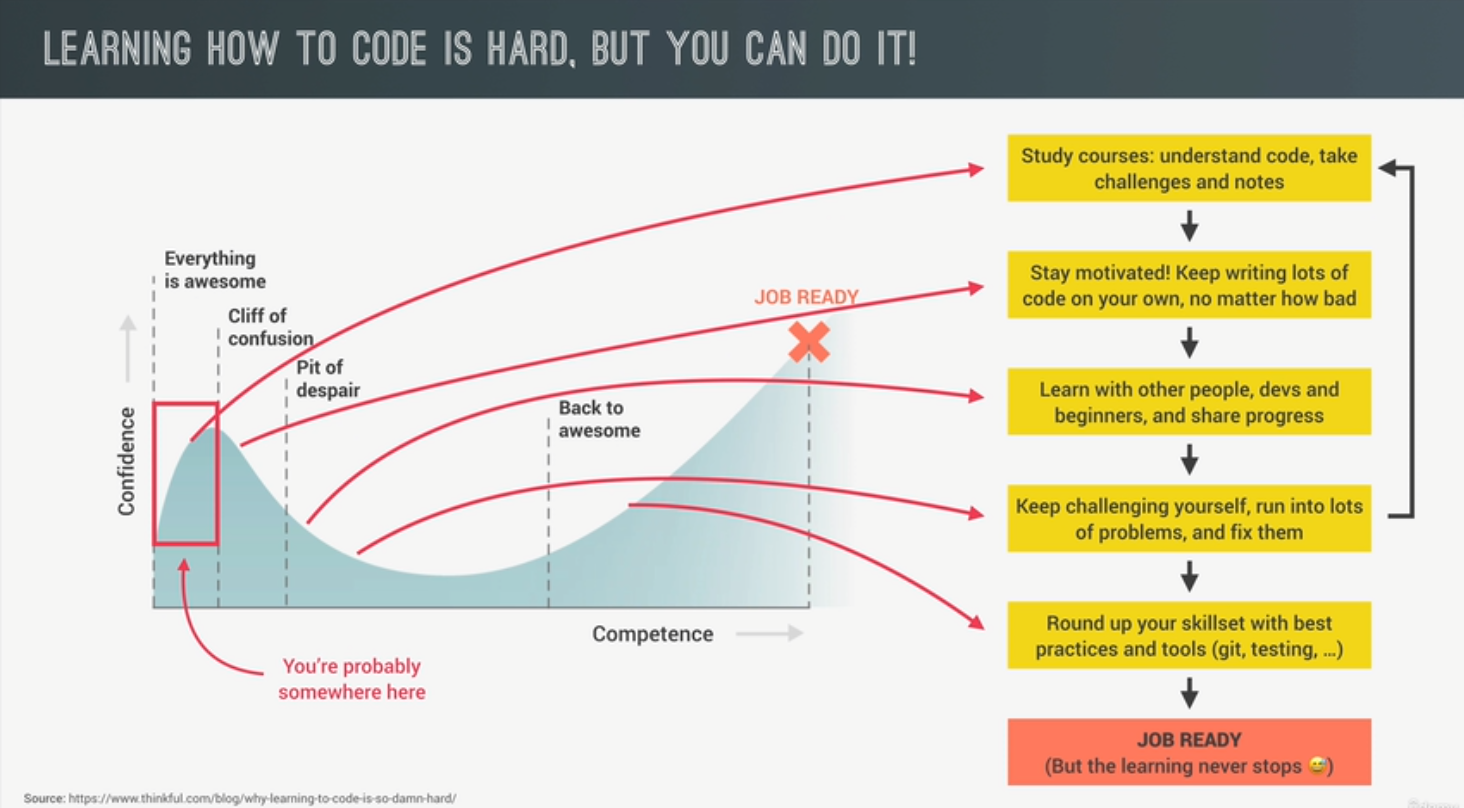
5-4 Learning How to Code

1.定目标;

我的初衷是想要做出自己的小应用(app),但是还没想好是什么功能。

前端+后端都要学。

2.课外练习;

否则会离不开教程。

3.能跑就行;

不拘泥于代码“质量”,不要感到沮丧。写,大量地写就完了。

干净、整洁的代码会随时间到来。

4.拥抱无知;

Embrace the fact that you will never know everything.

专注于你所需要的,达成你的目标。其它都不必要;

不要给自己太多预期和负担,

也不要和那些顶级开发者去作对比,

因为他们确实比你知道的多。(crap

5.分享交流;

不要孤立地学习编程。

和别人交流你的概念,能解释出来才好;

亮出你的目标,让自己需要负责。

分享自己的学习进度,互相激励。

6.不,你还算不上一个Web Developer…

课程只是你人生的起点。

Just keep going, keep coding, and keep building.
{B66E13D3-2F8A-4CFE-AFE5-E4F873A62F13}

5-5 How to Think Like a Developer_ Become a Problem Solver
5-6 Using Google, StackOverflow and MDN

8:05 Stackoverflow上搜到相应的答案后,不要直接copy代码,重要的是理解解决方案和思路,然后在自己身上实现。

1
2
3
4
5
6
7
8
9
10
11
12
13
14
15
16
17
const temperatures = [3, -2, -6, -1, 'error', 9, 13, 17, 15, 14, 9, 5];
const calCTempAmplitude = function (temps) {
let max = temps[0];
let min = temps[0];
//循环遍历数组中的值
for (let i = 0; i < temps.length; i++) {
const curTemp = temps[i];
if (typeof curTemp != 'number') continue;
if (curTemp > max) max = curTemp; //如果比max大,存入max
if (curTemp < min) min = curTemp; //如果比min小,存入min
}
console.log(max, min);
return max - min;
};
const amplitude = calCTempAmplitude(temperatures);
console.log(amplitude);

如果要合并数组,使用concat:

1
const temps = temps1.concat(temps2);

5-7 Debugging (Fixing Errors)

bugs bruh

bugs

发现bug:意识到有bug

找bug:简单的小bug用控制台,复杂的就要用debugger(下节讲)

修bug:最简单的部分(

预防bug:寻找项目中所有相似的代码并修复,使用testing software测试

5-8 Debugging with the Console and Breakpoints

使用console:

(console. log / warn / error / table)

1
2
3
4
5
6
7
8
9
10
11
12
13
14
15
16
17
18
19
20
21
22
const measureKelvin = function () {
const measurement = {
type: 'temp',
unit: 'celsius',
// C) FIX
// value: prompt('Degrees celsius:'),
value: Number(prompt('Degrees celsius:')),
};

// B) FIND
console.table(measurement);

// console.log(measurement.value);
// console.warn(measurement.value);
// console.error(measurement.value);

const kelvin = measurement.value + 273;
return kelvin;
};

// A) IDENTIFY
console.log(measureKelvin());

使用dubugger:

例如F12 Sources.

dubugger实际上在loop中非常非常滴useful

set a breakpoint设置断点, 一行一行往下运行,我们只需要看哪里的结果和预期不符)

  • 在代码中添加 debugger; 字段可以在运行时自动打开Sources,并设置断点。

5-9 Coding Challenge #1

1
2
3
4
5
6
7
8
9
10
11
12
13
14
15
16
17
18
19
20
21
22
23
24
25
26
27
28
29
30
31
32
33
34
35
36
/*
Given an array of forecasted maximum temperatures, the thermometer displays a string with these temperatures.

Example: [17, 21, 23] will print "... 17ºC in 1 days ... 21ºC in 2 days ... 23ºC in 3 days ..."

Create a function 'printForecast' which takes in an array 'arr' and logs a string like the above to the console.

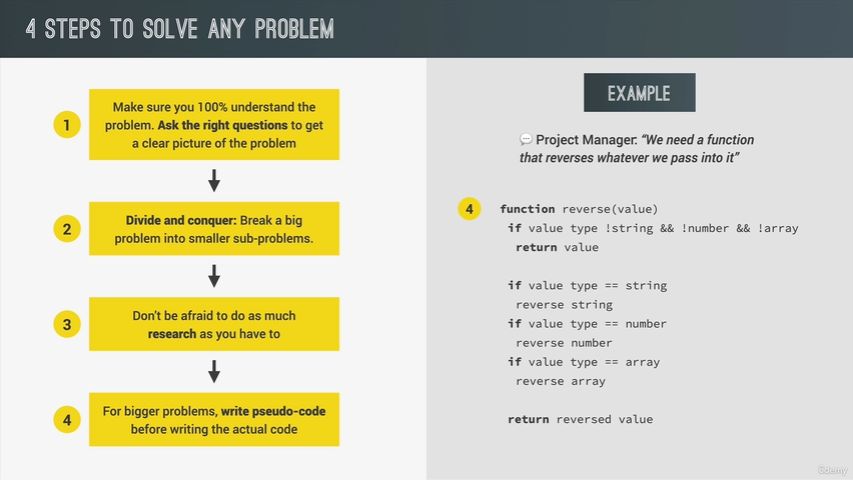
Use the problem-solving framework: Understand the problem and break it up into sub-problems!

TEST DATA 1: [17, 21, 23]
TEST DATA 2: [12, 5, -5, 0, 4]
*/

// 1) Understanding the problem
// - Array transformed to string, separated by ...
// - What is the X days? Answer: index + 1

// 2) Breaking up into sub-problems
// - Transform array into string
// - Transform each element to string with ºC
// - Strings needs to contain day (index + 1)
// - Add ... between elements and start and end of string
// - Log string to console

const printForecast = function (arr) {
let max = arr[0];
for (let i = 0; i < arr.length; i++) {
const curTemp = arr[i];
if (typeof curTemp != 'number') continue;
if (curTemp > max) max = curTemp;
console.log(`The maximum temperature is ${max}ºC in ${i + 1} days`);
}
return max;
};

printForecast([12, 5, -5, 0, 4]);

我的风格是想到哪写哪,实现完一个sub-problem后再回过头去想想另一个,最后能跑就行。所以第一遍${i} days没有写+1,看到结果有bug就回来修。

我认为这是目前对我比较有效率的做法,因为实践出真知,修bug总比找bug简单。(在代码量少的情况下/doge)

如果能静下心来分析问题,像他这样一个一个列出来,肯定是让人神清气爽的。也许在做一些大项目的时候会更有用。

要仔细看题,我还以为…是自己填充。结果它就要的是…,还得格式一模一样,改代码。

1
2
3
4
5
6
7
8
9
10
11
12
13
14
const printForecast = function (arr) {
let max = arr[0];
let str = ``; //名字直接用的str,好像没事
for (let i = 0; i < arr.length; i++) {
const curTemp = arr[i];
if (typeof curTemp != 'number') continue;
if (curTemp > max) max = curTemp;
str = str + `... ${max}ºC in ${i + 1} days `;
}
console.log(str + `...`);
return str + `...`;
};

printForecast([17, 21, 23]);

又看了看教程,发现它只是要拼接字符串,并不用比较大小……随便吧

贴上标准答案

1
2
3
4
5
6
7
8
9
10
11
12
13
const data1 = [17, 21, 23];
const data2 = [12, 5, -5, 0, 4];

console.log(`... ${data1[0]}ºC ... ${data1[1]}ºC ... ${data1[2]}ºC ...`);

const printForecast = function (arr) {
let str = '';
for (let i = 0; i < arr.length; i++) {
str += `${arr[i]}ºC in ${i + 1} days ... `;
}
console.log('...' + str);
};
printForecast(data1);
  • Title: 【UdemyJS】Section5笔记(共9节)开发技能&编辑器安装
  • Author: Artificial-Fool
  • Created at : 2024-12-06 03:46:53
  • Updated at : 2024-12-13 18:28:27
  • Link: https://space.bilibili.com/636023121/2024/12/06/UdemyJS-note5/
  • License: This work is licensed under CC BY-NC-SA 4.0.
Comments